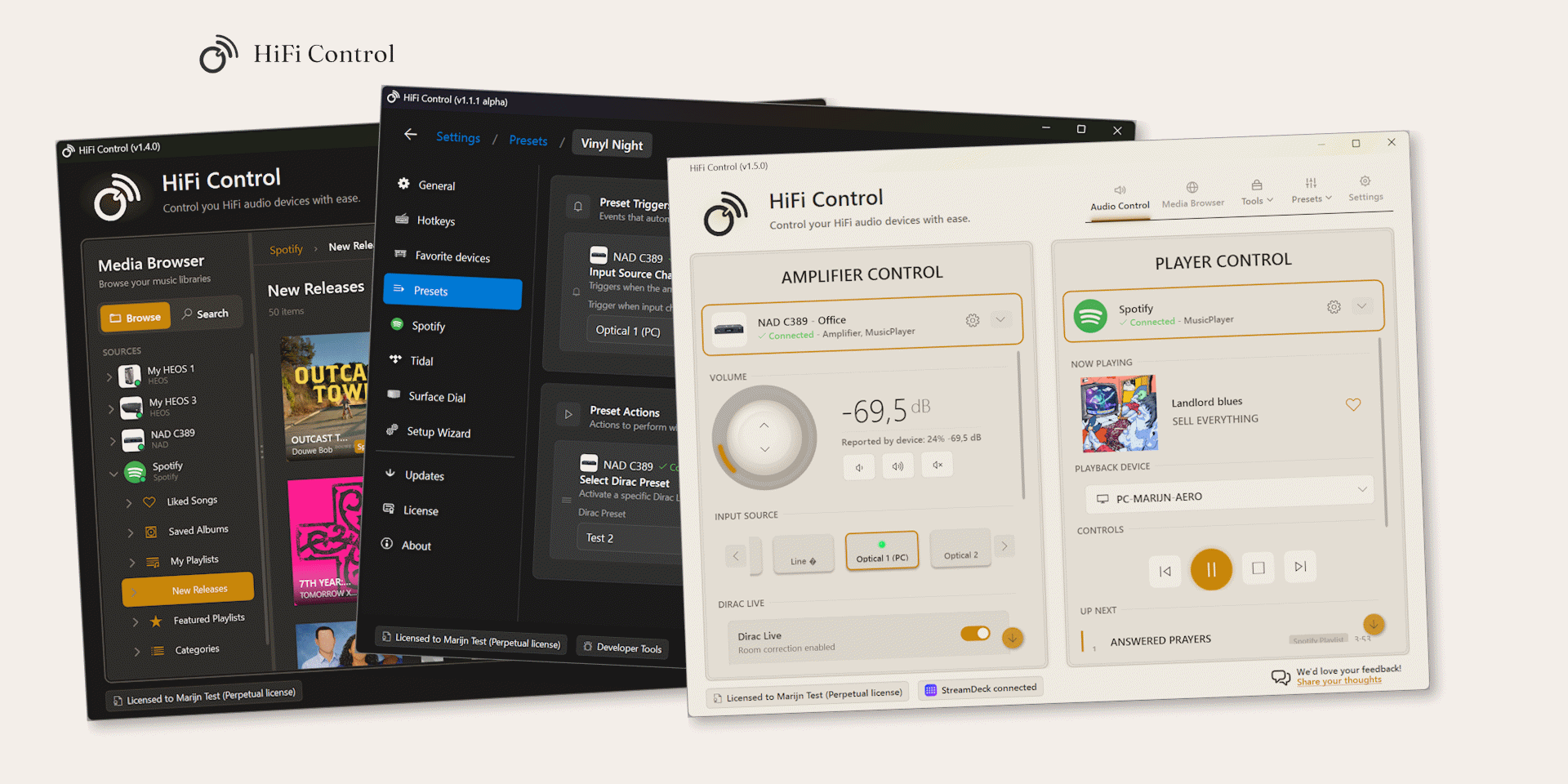
HiFi Control is the only Windows desktop app that controls BluOS, HEOS and MusicCast from one place, with global hotkeys, a system-tray icon, advanced hardware integrations like the Microsoft Surface Dial and Elgato Stream Deck, and cross-ecosystem presets. Roon is the obvious comparison, but it’s really a music-library platform: it needs an always-on server and won’t trigger hotkeys unless its own window is focused. Home Assistant can reach all three ecosystems too, though only after you set up and maintain a server. If what you actually want is a proper Windows remote for premium streaming gear, HiFi Control is built for exactly that.
Why is there no good desktop app for networked HiFi?
All three of the big premium audio ecosystems were built phone-first. Denon and Marantz never shipped a HEOS desktop app at all, so on Windows or Mac you’re stuck with their iOS and Android apps. Yamaha’s MusicCast Controller is mobile-only as well. BluOS (Bluesound, NAD) is the one exception with an official desktop controller, but it’s basically the phone app in a window: you still click around in it, and there’s no keyboard control, tray icon or volume knob.
HiFi Control fills that gap. It speaks to all three ecosystems natively, plus Spotify and Tidal, and it behaves the way a Windows program should. Hotkeys fire from any app, it lives in the system tray, and you can spin a dial to change the volume.
What does HiFi Control actually do?
HiFi Control is a paid Windows 10/11 app that finds your networked amplifiers and streamers across BluOS, HEOS and MusicCast and controls them from a single window. It’s about control and integration. It doesn’t re-stream your music through its own software.
Here’s what it does:
- System-wide hotkeys for volume, mute, playback, input switching and amplifier switching. They keep working when the app isn’t focused, including inside full-screen games.
- System-tray integration with a mute-state icon, a context menu, a jump list and single-instance behaviour.
- Dirac Live preset switching and A/B comparison on compatible BluOS amplifiers. It seeks back automatically so you hear the same passage on every preset.
- Hardware controller integration with the Microsoft Surface Dial and the Elgato Stream Deck. Rest a Surface Dial on the desk and turn it to set amplifier volume, with a configurable click action. Or map Stream Deck keys to volume, mute, inputs, players and whole presets, so a single button switches an amplifier, sets the volume and starts a playlist.
- Cross-ecosystem presets that chain several steps together: pick an amplifier, set the input, set the volume, toggle mute, choose a player, start a playlist, switch a Dirac preset. A preset can run on program startup or shutdown, when an input changes, or from a hotkey.
- A floating volume overlay that’s click-through, always on top and hides itself.
- Automatic discovery and reconnection, so if a device picks up a new IP address it finds it again on its own.
That’s the current feature set, and it keeps growing. The public roadmap lays out what’s coming next, from new integrations to control tricks the official apps don’t attempt.
Is Roon a good way to control HiFi from a Windows PC?
Roon is great for browsing and organising a music library, but it was never meant to be a hardware remote, and that shows on the desktop. It needs a dedicated, always-on Roon Core (a PC, a NAS, or Roon’s own Nucleus), it costs a lot more than a control app, and its keyboard shortcuts only work while the Roon window is focused.
That last point is the dealbreaker for desk use. People have asked Roon for global, out-of-focus playback hotkeys on the community forum since November 2016, and it still isn’t there.
Roon also pushes its own audio pipeline (RAAT) to endpoints, so it sets volume on Roon Ready devices but doesn’t act as a remote for what your gear can natively do. It has no MusicCast support, and it can’t switch AVR zone power or inputs on HEOS receivers. As a whole-house music brain it’s excellent, assuming you’re happy running a server. As a lightweight desktop remote with hotkeys and a tray icon, it just isn’t the right tool.
Can Home Assistant control BluOS, HEOS and MusicCast?
It can. Home Assistant has integrations for Bluesound, Denon HEOS and Yamaha MusicCast. The catch is that Home Assistant is a home-automation platform, so you’re signing up for setup, upkeep and a server that stays on. You run it on something like a Raspberry Pi, a mini-PC or a Docker container, add each integration, then build your own dashboard. Out of the box there’s no Windows global-hotkey layer, no tray volume control and no Surface Dial.
The integrations have limits too. The HEOS one can’t touch AVR features like zone selection or power on/off. They’re also a small slice of the Home Assistant world, with HEOS at roughly 3.1% and MusicCast at 1.8% of active installs. If you already run a server for smart-home stuff, none of this is a big ask. If you just want to nudge the volume from your keyboard while you work, standing up and maintaining Home Assistant is a lot of effort for a worse desktop experience.
How does HiFi Control compare to the alternatives?
Every option here is good at something. None of the others control all three ecosystems with proper Windows integration.
| Capability | HiFi Control | Roon | Official BluOS Controller | HEOS / MusicCast apps | Home Assistant |
|---|---|---|---|---|---|
| Controls BluOS | Yes | Yes (Roon Ready) | Yes | n/a | Yes |
| Controls HEOS | Yes | Streams to; no zone/input control | No | Mobile only (no desktop) | Yes (no AVR zone/power) |
| Controls MusicCast | Yes | No | No | Mobile only (no desktop) | Yes |
| Global out-of-focus hotkeys | Yes | No (open request since 2016) | No | No | No (not native to Windows) |
| System-tray control | Yes | No | No | No | No |
| Surface Dial / Stream Deck | Yes | No | No | No | No |
| Cross-ecosystem presets | Yes | No | No | No | Possible, manual to build |
| Dirac preset A/B switching | Yes | No | Multiple taps, no A/B | No | No |
| Requires dedicated server | No | Yes (Roon Core) | No | No | Yes (always-on) |
| Native Windows desktop app | Yes | Yes | Yes (BluOS only) | No | Browser-based |
What does HiFi Control cost compared to Roon?
HiFi Control costs a fraction of Roon and offers both lifetime and subscription licenses. New users can evaluate the Essentials feature set for 14 days without entering payment details; the trial starts only after supported equipment is discovered and the user chooses to begin.
| Plan | HiFi Control | Roon |
|---|---|---|
| Free trial | 14-day Essentials trial, no card required | 14 days |
| Monthly | €4.99 (Advanced) / €9.99 (Premium) | US$14.99 billed monthly |
| Annual | Not offered | US$149.88 (≈ US$12.49/month) |
| One-time / lifetime | €14.99 Essentials — Lifetime License / €199 Advanced — Lifetime License | US$829.99 lifetime |
| Server required | No | Yes (Roon Core) |
The €14.99 Essentials — Lifetime License provides core controls, Spotify, three presets, and one saved device on two personal PCs. Advanced adds unlimited presets, multi-device control, Tidal, advanced hotkeys and Stream Deck actions, and the Dirac A/B tool. Advanced is also available as the €199 Advanced — Lifetime License for the v1 generation. Eligible existing Free installations keep their current functionality as Legacy Free on that installation through in-place updates; a clean reinstall or replacement PC starts the trial and purchase flow.
Which devices and brands does HiFi Control support?
HiFi Control handles the hardware in each ecosystem. On BluOS that’s Bluesound, NAD, DALI, Monitor Audio, Roksan and Cyrus Audio. On HEOS it’s Denon and Marantz receivers and wireless speakers. On MusicCast it’s Yamaha’s networked gear, covering volume, input and playback. Spotify and Tidal are wired in for playback control and “like the current song,” with hotkeys for both.
That range is the point, because mixed setups are everywhere. Own a Bluesound Node, a Denon AVR and a Yamaha receiver? No manufacturer app and no other desktop tool drives all three from one window. More ecosystems, streaming services and devices are planned, too, and you can see what’s lined up on the roadmap.
Who is HiFi Control for?
It’s for people who own good networked audio gear (Bluesound, NAD, Denon, Marantz, Yamaha) and spend their day on a Windows PC. If there’s a streamer or integrated amp sitting near your desk and you keep reaching for your phone to change the volume, this puts that control on your keyboard, in your tray, and on hardware like a Surface Dial or an Elgato Stream Deck.
It pays off most when your gear spans more than one ecosystem. The official apps each lock you to a single brand, and Roon, the strongest desktop alternative, drops MusicCast entirely and can’t do much with HEOS receivers.
Frequently asked questions
Does HiFi Control work without an internet connection?
It talks to your devices over the local network, so day-to-day control doesn’t rely on the internet. The Advanced — Lifetime License also runs fully offline after initial activation, with no recurring licence checks.
Is there an official HEOS or MusicCast desktop app?
No. Denon/Marantz (HEOS) and Yamaha (MusicCast) only make iOS and Android apps. A few third-party desktop tools exist for one ecosystem or the other, but HiFi Control is the one that brings all three together on Windows.
Does HiFi Control replace Roon?
Not really, they do different jobs. Roon manages and streams your music library; HiFi Control is the hardware remote and desktop layer on top of your gear. Plenty of people run both: Roon for browsing, HiFi Control for quick keyboard and dial control.
Can it switch Dirac Live room-correction presets?
Yes. On compatible BluOS amplifiers you can switch Dirac presets from a hotkey and run an A/B comparison with automatic seek-back. The native BluOS app takes several taps to change a Dirac filter and has no A/B tool.
Which streaming services are supported?
Spotify and Tidal, with playback control and a “like the current song” action you can map to hotkeys.
Does it need administrator rights or a special server?
No. It’s a standard Windows 10/11 app (around 90 MB) with no separate server to run, unlike Roon (Roon Core) or Home Assistant (an always-on host).
What’s coming next for HiFi Control?
Updates land regularly. The public roadmap shows what’s in progress and what’s planned, including new ecosystems, streaming services and control features. You can also suggest ideas, which feed directly into what gets built next.
Try HiFi Control
If you run premium networked audio from a Windows PC, HiFi Control adds the keyboard, tray and dial control the official apps skip, across BluOS, HEOS and MusicCast, all in one app. It’s also moving fast, so it’s worth a look at the roadmap to see where it’s headed.
Ready to take control?
v1.6.4 · October 8, 2026 · 65 MB · Windows 10/11
Download HiFi ControlEssentials is €14.99 once · 14-day trial · No card required